> ## Documentation Index
> Fetch the complete documentation index at: https://docs.asendia.ai/llms.txt
> Use this file to discover all available pages before exploring further.
# JobDiva x Asendia: AI Interview Integration Guide
> This guide explains how to set up AI interviews, trigger them for candidates, and view the results directly within JobDiva.
## JobDiva Integration – Customer Guides
Below you’ll find **two** short, non‑technical guides:
1. **Connecting JobDiva to Our Platform** – what you need to do once.
2. **What Happens After You Connect** – how everything works automatically.
## **1. Setup & Configuration**
### **Connect JobDiva**
First, ensure your JobDiva organization is connected to Asendia. You will need:
* **Client ID**
* **Username**
* **Password**
### Set up **JobDiva** custom fields
1. **Go to JobDiva and add new user-defined fields for the job**
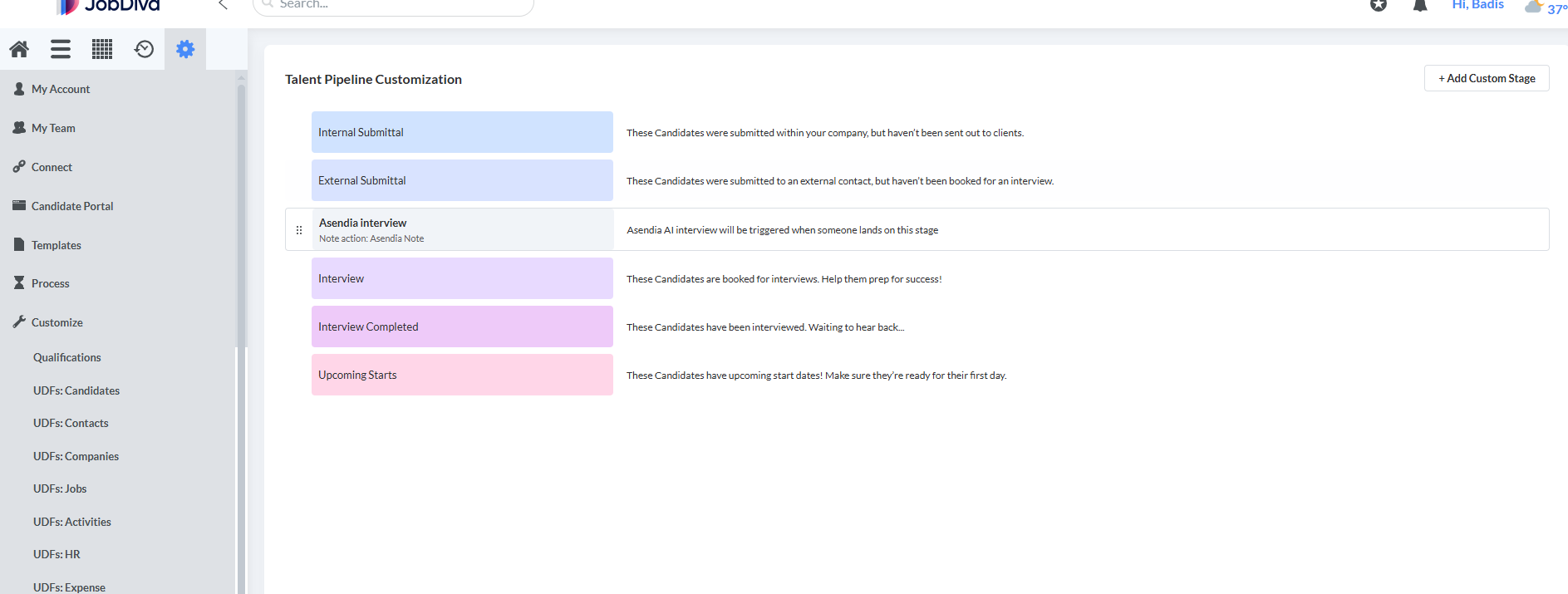
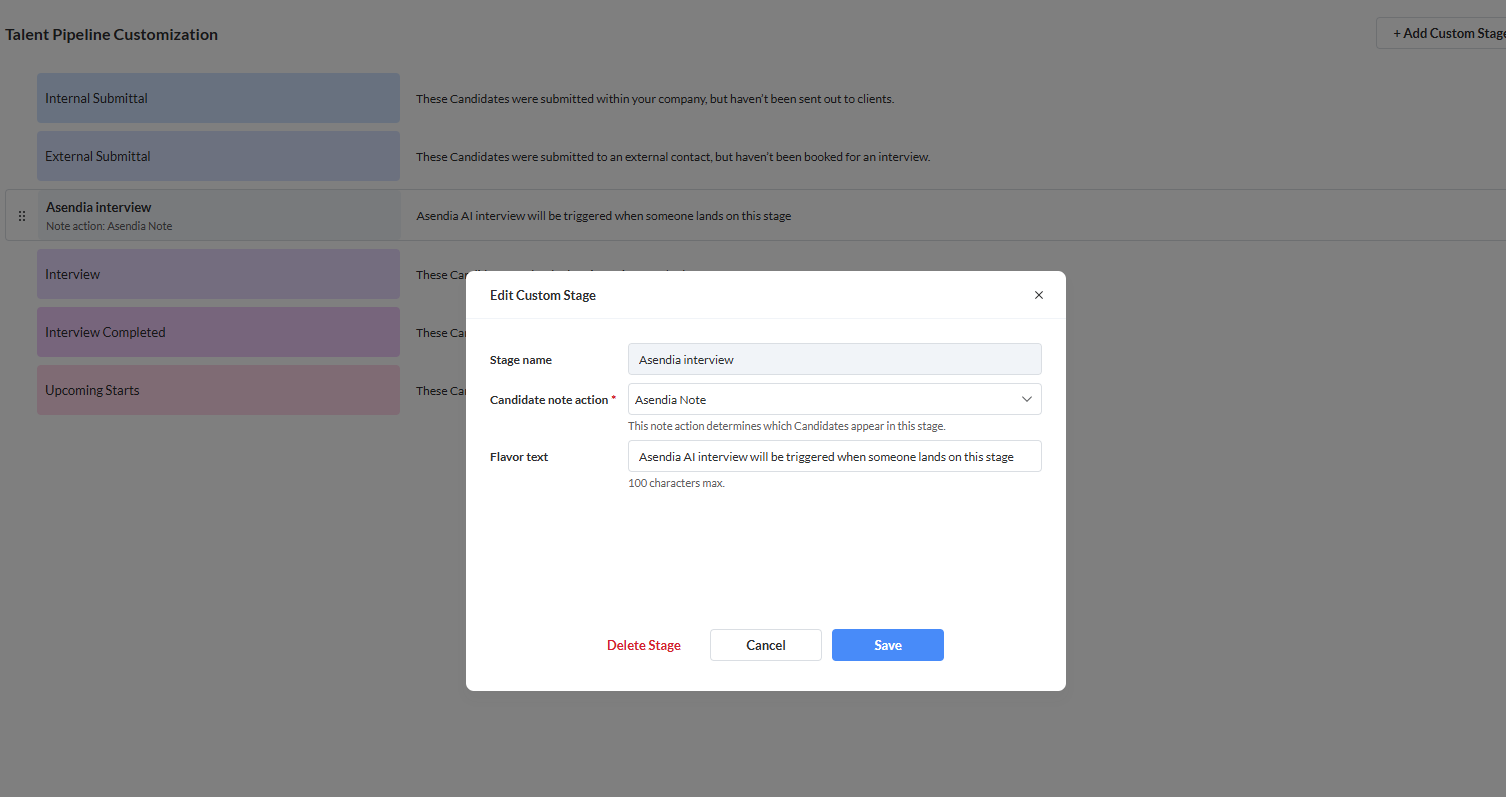
 2. **Create a new pipeline (custom stage) called Asendia Interview**
 ### **Enable AI Interviews (Hybrid Mode)**
To enable AI interviews for a specific job, you need to configure **User Fields** in JobDiva.
1. **Open a Job** in JobDiva.
2. Locate the **User Fields** section (or Custom Fields).
3. Add/Update the following fields:
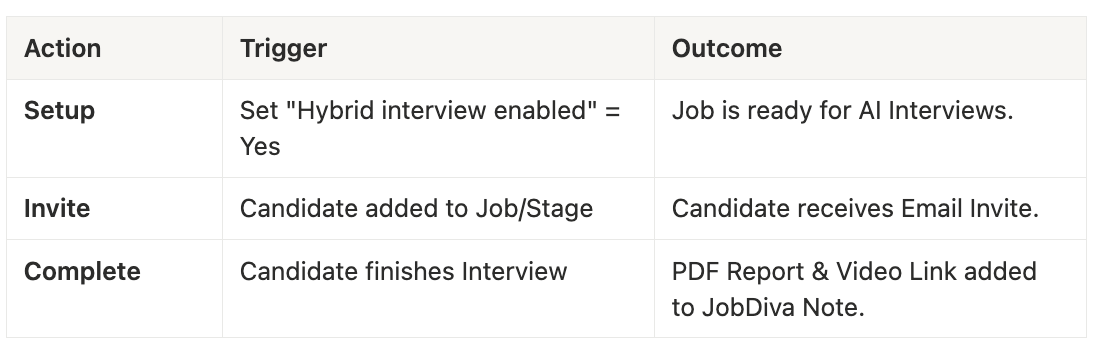
* **Hybrid interview enabled**: Set to `Yes`, `yes`
* **Hybrid Interview Questions**: Enter your custom interview questions here.
* *Format*: Numbered list (e.g., `1. Tell me about yourself. 2. What is your experience with Python?`) or separate with new lines.
> Note: If "Hybrid interview enabled" is set to No or left blank, the system may default to a standard AI-Dynamic interview based on the job description.
## **2. Triggering the Interview**
aOnce the integration is active and the job is set up:
1. **Triggering the Interview**: You have to go to Talent Pipeline, drag the candidate from one stage to `Asendia Interview`
### **Enable AI Interviews (Hybrid Mode)**
To enable AI interviews for a specific job, you need to configure **User Fields** in JobDiva.
1. **Open a Job** in JobDiva.
2. Locate the **User Fields** section (or Custom Fields).
3. Add/Update the following fields:
* **Hybrid interview enabled**: Set to `Yes`, `yes`
* **Hybrid Interview Questions**: Enter your custom interview questions here.
* *Format*: Numbered list (e.g., `1. Tell me about yourself. 2. What is your experience with Python?`) or separate with new lines.
> Note: If "Hybrid interview enabled" is set to No or left blank, the system may default to a standard AI-Dynamic interview based on the job description.
## **2. Triggering the Interview**
aOnce the integration is active and the job is set up:
1. **Triggering the Interview**: You have to go to Talent Pipeline, drag the candidate from one stage to `Asendia Interview`
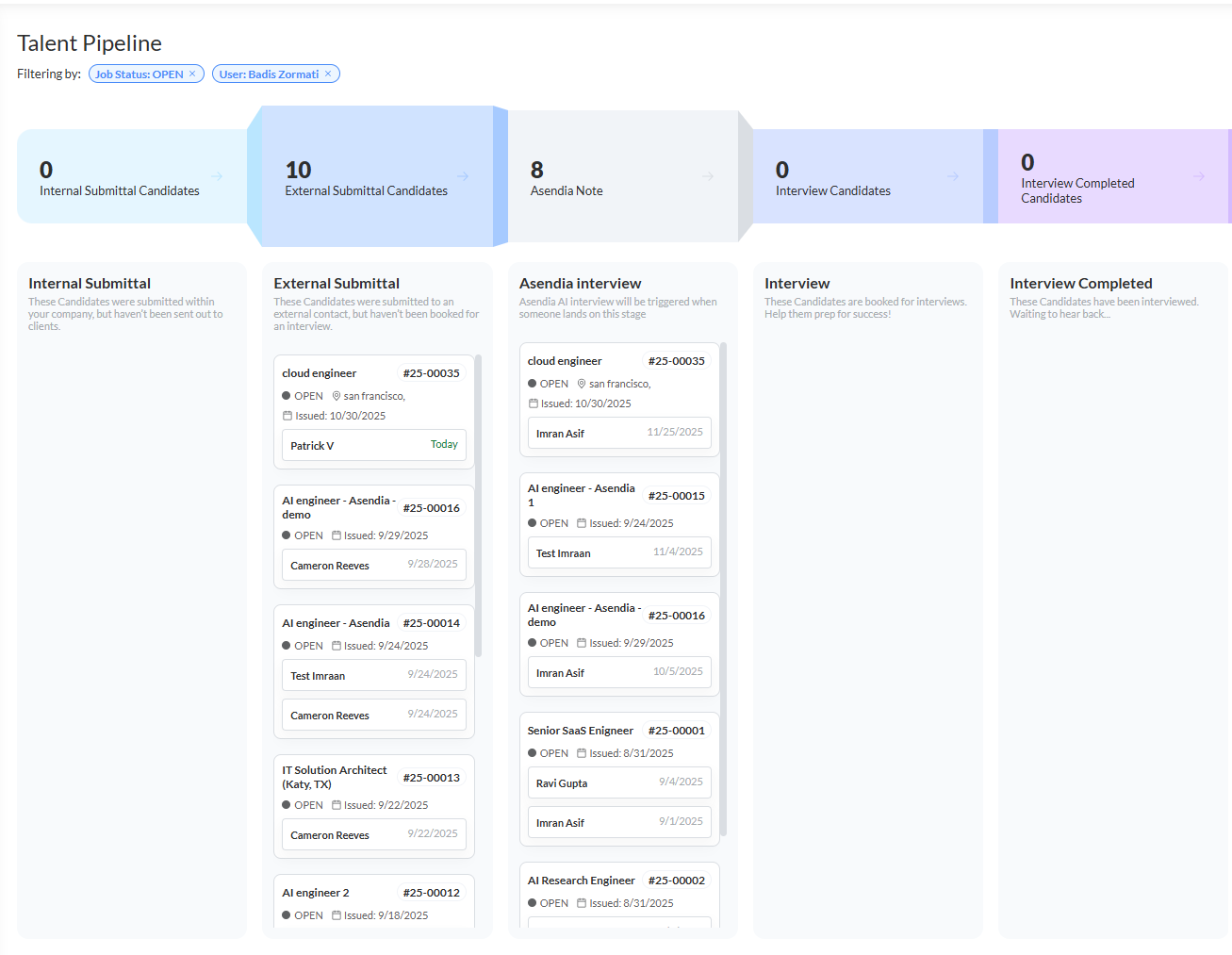 2. **Invitation**: The candidate automatically receives an email invitation with a secure **Magic Link**.
3. **Verification**: The candidate clicks the link and verifies their identity (using their email) to access the AI Interview portal.
## **3. Post-Interview Results**
After the candidate completes the AI interview, the results are automatically synced back to JobDiva.
### **Where to find results:**
* **Candidate Notes**: A new note is created in the candidate's profile.
* **Subject**: "AI Interview Assessment - \[Job Title]"
* **Content**: Contains a summary of the interview.
* **Attachments**:
* **PDF Report**: A comprehensive "Interview Assessment Report" is attached to the note/candidate record. This includes the AI's evaluation, scores, and transcript summary.
* **Video Recording**: A link to the full video recording of the interview is provided in the note.
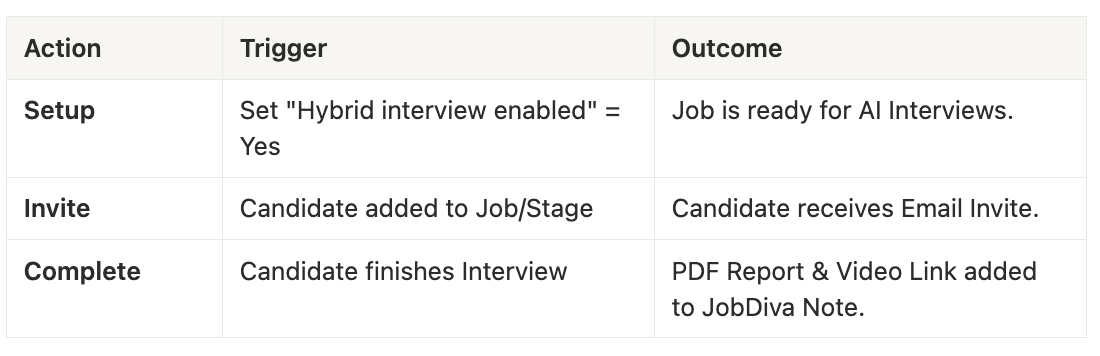
### **Triggers Summary**
2. **Invitation**: The candidate automatically receives an email invitation with a secure **Magic Link**.
3. **Verification**: The candidate clicks the link and verifies their identity (using their email) to access the AI Interview portal.
## **3. Post-Interview Results**
After the candidate completes the AI interview, the results are automatically synced back to JobDiva.
### **Where to find results:**
* **Candidate Notes**: A new note is created in the candidate's profile.
* **Subject**: "AI Interview Assessment - \[Job Title]"
* **Content**: Contains a summary of the interview.
* **Attachments**:
* **PDF Report**: A comprehensive "Interview Assessment Report" is attached to the note/candidate record. This includes the AI's evaluation, scores, and transcript summary.
* **Video Recording**: A link to the full video recording of the interview is provided in the note.
### **Triggers Summary**
 🔥 **Asendia AI isn’t just automating interviews — it’s reinventing them.**
***
🔥 **Asendia AI isn’t just automating interviews — it’s reinventing them.**
***